Top 5 Wireless Parking Camera Tips for Hassle Free Parking?
Parking can often be a stressful experience, especially in crowded areas. The advent of the Wireless Parking Camera offers a solution to this common problem. These cameras provide real-time views of your vehicle's surroundings, enhancing safety and confidence while parking. However, not all wireless parking cameras are created equal, and maximizing their potential requires a bit of knowledge.
Choosing the right Wireless Parking Camera is crucial. Some users overlook the importance of proper installation. A poorly positioned camera can create blind spots and lead to accidents. Also, understanding how to use the camera effectively can significantly improve your parking skills. Many drivers feel over-reliant on this technology, which can be a pitfall. It's vital to maintain situational awareness while parking.
In this guide, we'll explore five practical tips for using a Wireless Parking Camera effectively. These insights will enhance your parking experience, making it more efficient and stress-free. Ensuring the right approach to your wireless camera can change the way you view parking altogether.

Understanding the Basics of Wireless Parking Cameras
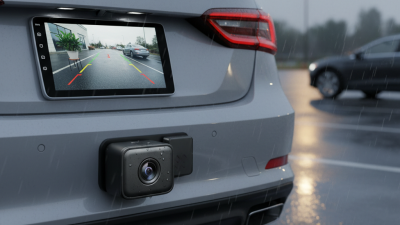
Wireless parking cameras are a game-changer for modern drivers. They provide real-time visuals of your surroundings, making tight parking spots more manageable. Understanding how these cameras work is essential for safe parking. Most systems consist of a camera mounted on the vehicle and a display screen inside. This setup eliminates blind spots, giving you a complete view of the area behind your car.
Installation is straightforward, yet some users may face challenges. Connection issues can arise if the camera and screen aren’t properly paired. Users should ensure that both devices are charged and that the wireless signals are clear. Distance from the camera to the screen matters. Obstructions can lead to poor image quality. If the images are blurry or laggy, it may be time to troubleshoot.
While these cameras enhance safety, they are not foolproof. Users can become overly dependent on technology and ignore their mirrors. This can lead to accidents. Practical experience is key. Drivers should still check their surroundings before backing up, using the camera as an additional aid. Balancing technology and traditional methods remains crucial for successful parking.
Top 5 Wireless Parking Camera Tips for Hassle Free Parking
| Tip |
Description |
Benefits |
Key Consideration |
| Choose the Right Camera |
Select a camera with a wide-angle lens and good night vision. |
Enhanced visibility in various lighting conditions. |
Ensure the resolution meets your needs. |
| Proper Installation |
Mount the camera at the optimal height and angle for best view. |
Reduces blind spots and improves usability. |
Check if the mounting kit is included. |
| Regular Maintenance |
Clean the camera lens and ensure the battery is charged. |
Ensures clear images at all times. |
Set reminders for maintenance checks. |
| Use with a Monitor |
Connect the camera to a monitor or mobile app for real-time viewing. |
Better control over parking maneuvers. |
Verify app compatibility with your device. |
| Check for Interference |
Ensure the wireless signal is strong and check for obstacles. |
Improved connectivity and reliability. |
Consider using a signal booster if needed. |
Key Features to Look for in Wireless Parking Cameras
When selecting a wireless parking camera, several key features stand out. A high-definition resolution is critical for clear images, making it easier to detect obstacles or pedestrians. Research indicates that cameras with at least 720p resolution significantly improve safety during parking maneuvers. The field of view also matters; wider angles can capture more of the surroundings. Cameras with a 180-degree view are particularly effective in tight spaces.
A reliable wireless connection is essential. Interference can lead to dropouts, which may cause confusion while parking. Look for systems using advanced technology like digital signals. This ensures a stable connection, with minimal lag. Regular feedback from users highlights that good wireless range still tops the list when it comes to satisfaction.
Consider night vision as another important factor. Many accidents occur in low-light conditions. Cameras equipped with infrared technology can enhance visibility significantly. According to a study, vehicles using night vision cameras report a 30% reduction in backing accidents compared to those without. Testing various models before committing can prevent disappointment down the line. Additionally, aesthetic design and ease of installation should not be overlooked; a cumbersome setup can quickly become a deterrent for usage.
Installation Guidelines for Optimal Camera Placement
Choosing the right placement for your wireless parking camera is crucial for effective use. Aim to mount your camera high enough to capture the surroundings without obstructions. This ensures a clear view of obstacles and pedestrians. Ensure the angle is adjusted for maximum visibility, covering blind spots that can lead to accidents.
When installing, consider the light conditions in your typical parking areas. Positioning the camera where it can avoid glare from bright sunlight or headlights can enhance image clarity. Regularly check and adjust the camera if necessary. Environmental changes or vehicle shifts might affect visibility and functionality.
Evaluate the camera's performance regularly. Test its view during different times of the day and weather conditions. If the footage seems unclear or inconsistent, take time to reassess the placement and angle. Document any issues you encounter, as this can help optimize camera performance over time. Engaging with online forums can also provide valuable insights from fellow users.
Tips for Effective Use of Your Wireless Parking Camera
When using a wireless parking camera, clarity is essential. Ensure that the camera lens is clean and free of obstructions. Dirt or scratches can impair visibility, leading to misjudgments during parking. Regular maintenance checks can help keep the camera in optimal condition.
Position is another crucial factor. Mount the camera at the right angle to capture the most useful view of your surroundings. Overhead or rear-mounted placements can offer different perspectives. Take time to adjust the angle to find what works best for your vehicle. Experimentation can lead to a better parking experience.
Connecting to your display should be seamless. If you're experiencing lag or connectivity issues, check the Wi-Fi signal strength. Weak signals can lead to frustrating delays. Try repositioning the camera or your receiver for better transmission. It's worth troubleshooting, as a stable connection significantly enhances your overall experience when parking.
Maintenance and Troubleshooting for Longevity and Performance
Wireless parking cameras enhance safety and convenience. To ensure their longevity, regular maintenance is crucial. Start by inspecting the camera lens for dirt or obstructions. A simple wipe can significantly improve clarity. It's surprising how much dust can accumulate in a short time. The quality of your images may degrade, leading to frustration during parking.
Troubleshooting common issues is essential for optimal performance. If the camera fails to connect or exhibits a shaky feed, check the power supply and connections. Often, loose wires cause more problems than you'd expect. It’s worth taking the time to secure these components properly. Sometimes, the camera may need a firmware update. Have you checked for updates recently? Ignoring this can lead to missed improvements and fixes.
Lastly, keep the user manual handy. It can provide guidance when issues arise. Many users overlook this useful resource. Reflection on how you maintain your camera can reveal areas for improvement. Breaking the routine and reviewing each step may uncover hidden problems. Regular maintenance can transform a frustrating experience into a seamless one.